Cool Tool Tuesdays: What I Use to Clean and Protect My MacBook Pro
Welcome to today’s installment of Cool Tool Tuesdays, where I feature a favorite item from my life and spotlight it so that others who are not familiar with the product may also benefit from it. A cool tool can be any book, gadget, software, hardware, material, or website that I have personally tried and love.
Do you have any questions about today’s cool tool? Would you like an item featured in the future? Please leave a comment to this post, or send me a message via my contact form. Enjoy!
Some people like to rough up their gadgets, add personalizations, and give it some character.
I am not one of those people. In fact, I am the complete opposite: I like to keep my gadgets looking as new as the first day I got them.
(This also helps tremendously with their resell values. I was able to sell my old 4-year-old PowerBook for $500!)
Loyal readers may remember that my beloved MacBook Pro died on me last fall. And when I finally got a replacement, I knew that I wanted to protect my investment. After all, it was THE biggest purchase I had made in years, in addition to being a fragile item I knew I would be using every day.
1. Protecting the Keyboard
One of the reasons I was so sad to have my old MBP die on me is because I vastly prefer the old body design of the MBP over the newer, unibody construction. (Anyone else with me?)
And the thing I hate the most about the unibody MBP? The black plastic keys.
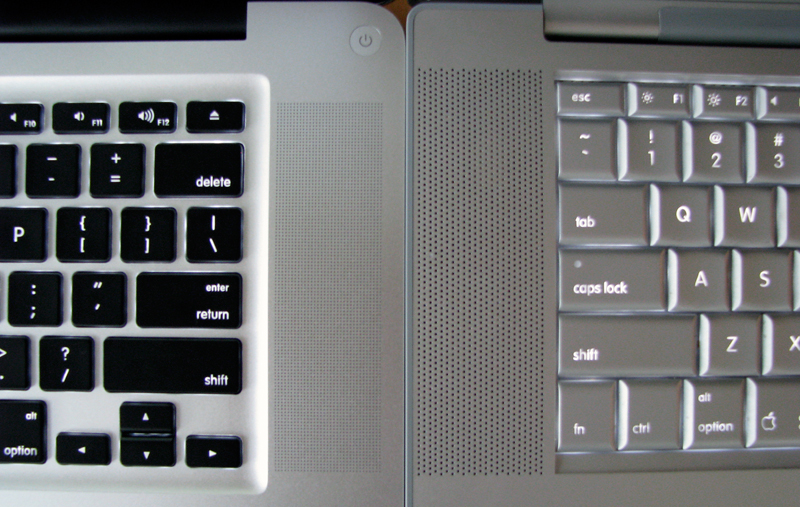
A comparison between the unibody MBP (left) and the older model, which I had (right).
(image source)
I loved the silver keys on the old MBP — a design which carried over from the PowerBook days, which was actually my first Apple computer back in 2001 — and believe that the black keys have a cheap feel to them compared to the silver ones. (Although to be fair, the silver keys were made of plastic too. However, they were sprayed with a matte silver finish that made them look metallic.)
And wouldn’t you know it — my fears were confirmed when, just TWO WEEKS into using my new MBP, shiny spots began to appear on the space bar and a couple of other most-used keys.
These shiny spots were not oil spots. Instead, they were “wear and tear” spots, from the matte finish on the keys wearing away.
A brief perusal of the web told me that indeed, this is a common problem among unibody MBP users and that the best course of action is to purchase a keyboard protector.
NOW YOU TELL ME!
I quickly discovered that best keyboard protector for the MBP is the Moshi ClearGuard, which is advertised as the thinnest keyboard cover/protector on the market at 0.1mm thin, or one-fifth the thickness of silicone protectors.
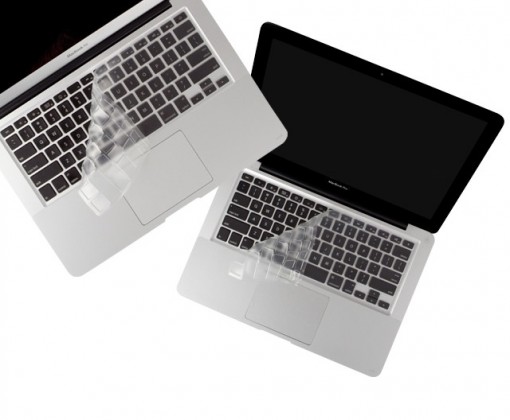
You might think that the $25 price tag is pretty steep for a piece of plastic. But I freakin LOVE this thing. It creates a bit more traction for typing, it allows for the keyboard lights to shine through, and I no longer need to worry about small spills, tiny particles entering the inside of my MBP through the keyboard cracks, or the dreaded shiny wear-and-tear spots on my keyboard.
The best part? It is washable and reusable!
As for the existing shiny spots on my keyboard? They were bothering me so much (yeah, I’m OCD with my gadgets) that I tried a potentially dangerous remedy: the Mr. Clean Magic Eraser. Because the Magic Eraser is a very fine abrasive, and because I would be wetting it before use, there was some potential for disaster.
However, I squeezed out all but the teeniest amount of water from the Magic Eraser before use, and very gently rubbed the offending spots. It took about 5 minutes of rubbing per key, but it worked. My keys looked brand new again. Problem fixed. 😀
3. Protecting the Body
What about the rest of the MBP? I certainly wanted to protect it from scratches as well as dinges and dents, which are all very likely with a very clumsy owner and two young children at home.
I decided that a hard case — despite the extra girth it would add, in addition to covering the beautiful design of the MBP — would be best suited for my needs and decided on Speck Products’ SeeThru Satin Case.
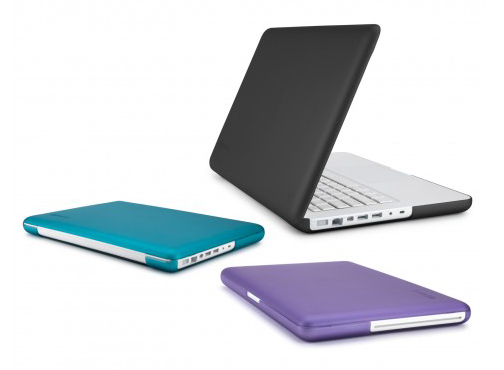
Installation was a snap — literally — and I love that the material is a smooth, rubbery texture. It has already protected my MBP from a number of incidents which would have surely left ugly scratches on the beautiful aluminum finish, and the case doubles as a sleeve for travel purposes.
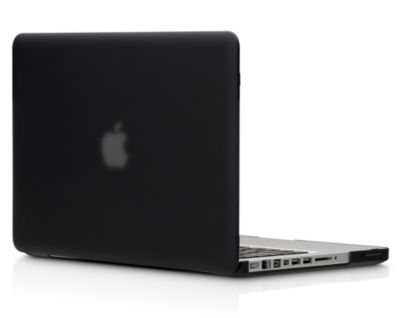
It is also transparent enough to let the lighted Apple logo softly shine through:
3. Cleaning the MacBook Pro
When I replaced my PowerBook with a MacBook Pro in 2008, I purchased an iKlear Cleaning Kit along with it.
And if you too, own an Apple product, you should get one too.
iKlear is the only brand that is used by Apple in its stores to get its products clean. It is both ammonia and alcohol free — both of which are chemicals that can damage your screen. (This isn’t false information to boost the sales of iKlear and other products like it. I have a friend who used an alcohol-based wipe on his MacBook Pro and it left a permanent streak.)
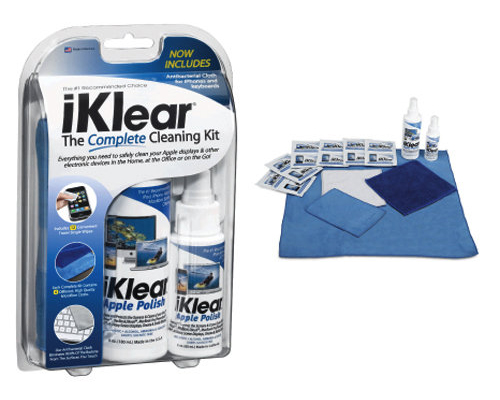
There are various iKlear kits available for sale, but all you really need are the basic three items: the spray, the antimicrobial microfiber cloth, and the chamois cloth. (The microfiber cloth is to clean the entire product in conjunction with the spray, while the chamois cloth is used dry, to buff the screen.)
If that isn’t incentive enough for you, I am still using the same exact kit I purchased in 2008. This stuff lasts a loooong time, and is completely worth every penny.
Which products, if any, do you use to keep your laptop — as well as other gadgets — clean and protected? Can you recommend any alternatives to the three I’ve listed above?



Ashley
Thanks for the info Jenny! I got my Macbook Air almost a year ago and it just kills me that it’s starting to look a little worn. I am definitely going to check out the iKlear!
Ro-Ro
Cool! I have the black speck case and the moshi guard as well. it’s crazy how much dust, dirt, and i’m embarrassed to say, grease, ends up on the moshi guard. how do you wash/clean your moshi?
Geek in Heels
I use dishwashing detergent to clean, then rinse, pat-dry with a towel, and let it air-dry until it’s completely dry. I have read that you should not wring/fold/bend it because it’ll stay that way!
MrsW
Just sent this on to my husband – he has a 2010 model year MBP and I know his case has a few scratches and also some key-wear. He was looking for a decent case for a long time and couldn’t find anything. Do you know if the Speck case is water-resistant? He rides a motorcycle to school and in the fall in Florida the afternoon rain comes hard every day.
Geek in Heels
Unfortunately, no, as the case is only meant to protect from everyday wear and tear, not act as a sleeve as I have used it the few times I’ve gone out with it. You can even see from the pictures that all the ports are exposed, and I imagine that this could be disastrous in wet weather!
Mandy
Interesting article! I noticed the shiny spots on my keys as well, but it never really bothered me since I assumed it was because of my sweaty hands. It’s funny because I prefer these keys SO MUCH to the old keyboard. Maybe I was just particularly messy and got too many crumbs stuck under the keys?? I hated taking them out to clean underneath them, and so far haven’t had the issue with these keys.
Also, I tried the speck case for an old macbook and found that it scratched the hell out of the computer case within a week of purchase, which infuriated me. Have their products improved? Have you found any damage to your mbp case?
Geek in Heels
You’re right — I had almost forgotten that the old keys could get little particles stuck under them! However, I’m pretty OCD about keeping my gadgets clean (as mentioned in the post), and regularly used a compressed air can on the laptop, so it never was a problem for me. I’ve also read that the old keys were softer than the new ones, and the change could be better or worse depending on your own personal preferences.
i’m sorry to hear that the Speck case scratched your old MacBook! I’m not sure if it was a problem they recently addressed, but my case fits perfectly and there has been no damage at all.
Lauren
This post reminds me of most gadgets I buy — it’s not just the cost of the doohickey I need to consider, it’s all the darn accessories that go along with it: charger, case, cleaner, etc.
Geek in Heels
Oooh, definitely. As a lover of gadgets, I’ve learned over the years to always include peripherals and accessories with the purchase price — they really do add up! Luckily, in this case, both my birthday and Christmas were in the same month I got the laptop, so I was able to include them on my Amazon Wishlist and received them as presents. 🙂
Belinda
I just impulse-bought the iklear and the moshi guard! I’m very excited to get them 🙂 I’ve had my macbook for about half a year now, and I’m sad that its starting to look worn. I hope these will help! Like a commenter above, I heard the speck case can sometimes scratch the macbook further with a bad fit, or if crumbs/dirt gets stuck between the case and laptop. I hope that wasn’t the case with you! Oh and just out of curiosity, what color case did you get? 🙂
Geek in Heels
I too, have heard that if crumbs or other hard particulates get trapped between the case and the laptop it can scratch…so I’m always extra careful about this!
At the same time, as I mentioned above to Mandy’s comment, I’m not sure if Speck redesigned their products after hearing these complaints (because I don’t know what their cases were like before), but looking at my case, it looks like it would be pretty difficult for particulates that would be large enough to scratch the laptop to get inside there, because it really creates a perfect fit.
Oh, and I decided on the black case. I was REALLY tempted by the teal or purple, but I know that bright colors are a lot easier to get sick of, so I decided to play it safe. 🙂
FB @ FabulouslyBroke.com
I use a keyboard protector too. My fingernails are curved so I will ALWAYS scratch out the keys no matter how short my nails are. WIth the keyboard protector, I type faster, quieter and without worrying about scratching the keys.
The protector is actually losing its letters now and I can almost see through it 😛 I may have to replace it soon.