Last week, the ingenius text input system Swype opened its beta for the Android platform — for free — and so I immediately downloaded a copy.
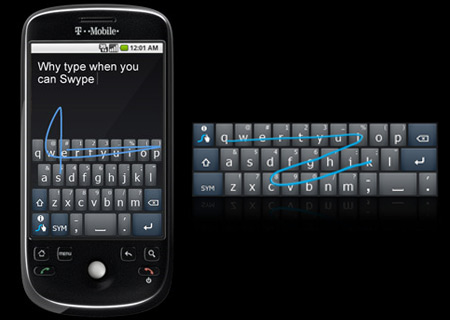
image source
Swype eliminates the need to tap out individual letters when typing on a touchscreen device. Instead, you glide your finger from letter to letter, forming words without your fingertip ever leaving the screen. It’s so elegant and fast that one Swype user even broke the Guinness World Record for fastest text messaging, a move that was famously documented in a recent Samsung commercial.
I’ve always preferred physical keyboards to their touchscreen counterparts, but after playing around with the Swype input system for a few days I’ve gotten hooked. I even demonstrated the new system to a few of my iPhone-carrying friends and even they admitted that they were impressed.
If you are a proud Android phone carrier like myself, go download a copy at http://beta.swype.com/. Hurry up, because the free download won’t be around for much longer!
P.S. — Swype is not available for the iPhone, but they say that a version is in development. The iPhone once had a decent alternative in an app called ShapeWriter; however, it has recently been pulled from the App Store due to SDK restrictions.



Ashley
If this is half as amazing as it looks, I will be so grateful to you for pointing it out. The one thing that I don’t like about my Google phone is the text system. My fingers are stupid and clumsy and it takes me twice as long to text as it did with my old T9 system.
Geek in Heels
@Ashley — It’s definitely worth it, in my opinion! And since it’s free, if you don’t like it you can always just delete it!
Liesal
I t0o prefer a physical keyboard to a touchscreen, but that’s all I have and it’s been a struggle learning to use it. I’m excited for this and really hope it helps!
Felicity
I am a jealous iPhone user! I have the original and need to upgrade soon (headphone jack is on its way out and I use my phone to run with) I’m debating between the droid & the new iPhone. Just can’t decide!
Opiboble
Awesome find! Thanks! (Downloading now)
Geek in Heels
@Felicity — There are certainly advantages and disadvantages to both! As a general rule of thumb, they say that you should choose the iPhone for ease of use and go with an Android phone for customization. If you can wait a couple more months I would definitely do so; by then the full iPhone 4 reviews will be out AND there will be some new Android phones on the market which should help you in your decision more. Good luck!
Elisa
Thanks for posting this! I dl’ed it for my fiance’s phone and he loves it. He didn’t know a beta was out. Hurray for brownie points!
Opiboble
Well I have been playing with it all day and I have to say I like it! Takes a little while to get used to "drag" typing but it is very fast, and if you don’t like the idea of "drag" typing then you will enjoy the fact that this is a great "taper" as well! it is a lot easier to type on this then the default keyboard on android (at least on HTC-Hero).
The one thing I do wish they change is the fact that you cant drag over the space bar to start the next word, you have to lift then place again 🙁
But that is a small downside to a GREAT upgrade 😀
-Opi out.