Jan
24
2012

Cool Tool Tuesdays: What I Use to Clean and Protect My MacBook Pro

Welcome to today’s installment of Cool Tool Tuesdays, where I feature a favorite item from my life and spotlight it so that others who are not familiar with the product may also benefit from it. A cool tool can be any book, gadget, software, hardware, material, or website that I have personally tried and love.

Do you have any questions about today’s cool tool? Would you like an item featured in the future? Please leave a comment to this post, or send me a message via my contact form. Enjoy!


Some people like to rough up their gadgets, add personalizations, and give it some character.

I am not one of those people. In fact, I am the complete opposite: I like to keep my gadgets looking as new as the first day I got them.

(This also helps tremendously with their resell values. I was able to sell my old 4-year-old PowerBook for $500!)

Loyal readers may remember that my beloved MacBook Pro died on me last fall. And when I finally got a replacement, I knew that I wanted to protect my investment. After all, it was THE biggest purchase I had made in years, in addition to being a fragile item I knew I would be using every day.

1. Protecting the Keyboard

One of the reasons I was so sad to have my old MBP die on me is because I vastly prefer the old body design of the MBP over the newer, unibody construction. (Anyone else with me?)

And the thing I hate the most about the unibody MBP? The black plastic keys.


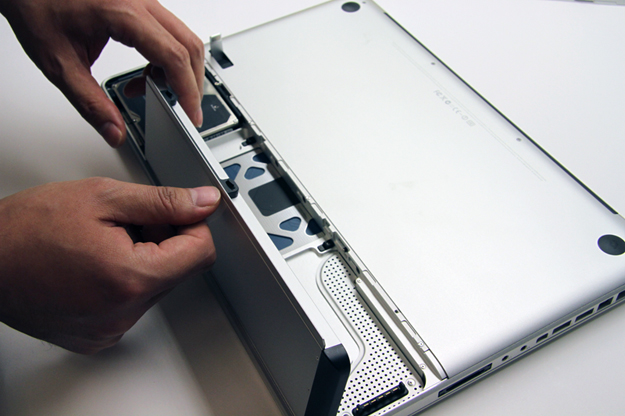
A comparison between the unibody MBP (left) and the older model, which I had (right).
(image source

I loved the silver keys on the old MBP — a design which carried over from the PowerBook days, which was actually my first Apple computer back in 2001 — and believe that the black keys have a cheap feel to them compared to the silver ones. (Although to be fair, the silver keys were made of plastic too. However, they were sprayed with a matte silver finish that made them look metallic.)

And wouldn’t you know it — my fears were confirmed when, just TWO WEEKS into using my new MBP, shiny spots began to appear on the space bar and a couple of other most-used keys.

These shiny spots were not oil spots. Instead, they were “wear and tear” spots, from the matte finish on the keys wearing away.

A brief perusal of the web told me that indeed, this is a common problem among unibody MBP users and that the best course of action is to purchase a keyboard protector.

NOW YOU TELL ME!

I quickly discovered that best keyboard protector for the MBP is the Moshi ClearGuard, which is advertised as the thinnest keyboard cover/protector on the market at 0.1mm thin, or one-fifth the thickness of silicone protectors.

You might think that the $25 price tag is pretty steep for a piece of plastic. But I freakin LOVE this thing. It creates a bit more traction for typing, it allows for the keyboard lights to shine through, and I no longer need to worry about small spills, tiny particles entering the inside of my MBP through the keyboard cracks, or the dreaded shiny wear-and-tear spots on my keyboard.

The best part? It is washable and reusable!

As for the existing shiny spots on my keyboard? They were bothering me so much (yeah, I’m OCD with my gadgets) that I tried a potentially dangerous remedy: the Mr. Clean Magic Eraser. Because the Magic Eraser is a very fine abrasive, and because I would be wetting it before use, there was some potential for disaster.

However, I squeezed out all but the teeniest amount of water from the Magic Eraser before use, and very gently rubbed the offending spots. It took about 5 minutes of rubbing per key, but it worked. My keys looked brand new again. Problem fixed. :-D

3. Protecting the Body

What about the rest of the MBP? I certainly wanted to protect it from scratches as well as dinges and dents, which are all very likely with a very clumsy owner and two young children at home.

I decided that a hard case — despite the extra girth it would add, in addition to covering the beautiful design of the MBP — would be best suited for my needs and decided on Speck Products’ SeeThru Satin Case.

Installation was a snap — literally — and I love that the material is a smooth, rubbery texture. It has already protected my MBP from a number of incidents which would have surely left ugly scratches on the beautiful aluminum finish, and the case doubles as a sleeve for travel purposes.

It is also transparent enough to let the lighted Apple logo softly shine through:

3. Cleaning the MacBook Pro

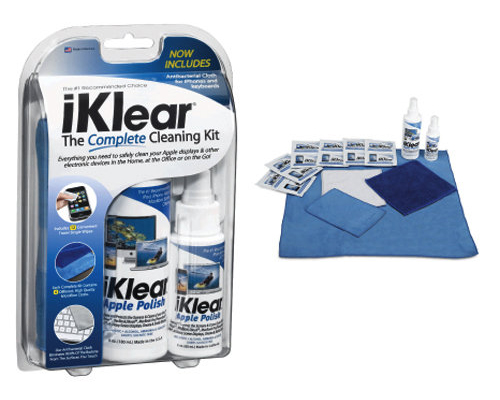
When I replaced my PowerBook with a MacBook Pro in 2008, I purchased an iKlear Cleaning Kit along with it.

And if you too, own an Apple product, you should get one too.

iKlear is the only brand that is used by Apple in its stores to get its products clean. It is both ammonia and alcohol free — both of which are chemicals that can damage your screen. (This isn’t false information to boost the sales of iKlear and other products like it. I have a friend who used an alcohol-based wipe on his MacBook Pro and it left a permanent streak.)

There are various iKlear kits available for sale, but all you really need are the basic three items: the spray, the antimicrobial microfiber cloth, and the chamois cloth. (The microfiber cloth is to clean the entire product in conjunction with the spray, while the chamois cloth is used dry, to buff the screen.)

If that isn’t incentive enough for you, I am still using the same exact kit I purchased in 2008. This stuff lasts a loooong time, and is completely worth every penny.


Which products, if any, do you use to keep your laptop — as well as other gadgets — clean and protected? Can you recommend any alternatives to the three I’ve listed above?

Dec
8
2011

Siri Now Tries Too Hard to Help People Get Abortions

Regardless of your stance on abortion, you can’t deny that these mock-ups, created in response to the reports of the iPhone 4S digital assistant’s inability to find abortion clinics, are pretty damn funny. :-)

Via Happy Place.

Nov
4
2011

Guest Post: I’m a Mac. No, a P.C. Neither? Both?

The following post comes from Nodakademic, a blogger-wife-student-professional (yeah, I don’t know how she does it all either) who resides in the chilly state of North Dakota. I really enjoy her blog and I think that we can be friends in real life if we didn’t live so far apart. Isn’t it funny how blogging can help form relationships with people you would otherwise have no clue of their existence?

In this guest post, Nodakademic writes about the great geek debate: P.C. or Mac?

I, personally, am a Mac girl but I agree with her that the quality of Apple has gone downhill in the past few years. (And I probably would have switched to P.C. or Linux if I don’t have all this expensive Mac software!) Another interesting fact: the picture of her from the launch of Mac OS X Panther? The launch of Panther was the first geek-related launch party I attended, and the first tech product I ever stood in line for!

I hope you enjoy this post, because I know I did! And I hope that you’ll leave a comment below weighing in on the Mac vs. P.C. debate!


I was a techie kid in the sense that only mid-90s kids can be techie. Armed with my Angelfire and Geocities homepages and my ICQ account, I was pretty sure I knew everything there was to know about computers. I got in to the field a wee bit too late to make millions in the boom (and then lose those millions in the crash), but I was a teenager at probably the only time when teens really did know much more about computers than anyone else.

When I turned 15 I got a job at a repair desk working on IBM and Dell laptops for a local college. I replaced screens, hard drives, motherboards. I saw the aftermath when someone’s toddler jammed half a sack of skittles in to their floppy disk drive (sticky), when someone spilled coke and tried to dry their keyboard with a hairdryer (sticky, melty), and when someone ran over their laptop with their car (sticky, shardy). And OF COURSE I knew that Windows ruled. Macs were just those dumb computers I had to use in my junior high keyboarding class.

When I went to college I got a Gateway laptop. It was problematic and glitchy, but that was clearly Gateway’s fault, not Windows 2000′s! I majored in computer science. I failed at it because apparently, I do *not* actually know everything there is to know about computers. Apparently people who want to know that stuff actually listen in class. And let’s face it: most of them didn’t grow up in rural northern Minnesota surrounded by sugar beet fields, as long as we’re talking odds. (I did finally graduate by the way, with a minor in computer & information tech and a major in *groan* political science.)

At the end of my sophomore year, while flopping around trying to decide on a major, I applied for and got a job at the campus bookstore. I was stationed in the electronics store (any UO folks out there ever shopped at the Digital Duck?) and I was hired because I knew about Windows computers. They needed someone who could enthusiastically sell one, because apparently most of the other employees there were Apple fan-boys. (Literally ‘boys.’ I was the only girl there for a while.)


Me in 2003; I believe this was the night OS 10.3: Panther was released.

Long story short, it turns out Apple computers had changed a little since the grey-screened little candy-colored monsters my high school kept locked in the smelly lab. They were… nice. Sleek. Sharp. Quick. They had software, and that software worked well. They worked with printers and mice and keyboards and drawing tablets (but I had heard Macs don’t work with ‘anything’?!).

And the iPod. Oh, the iPod. How freaking cool was THAT? I was working for the store at the very time that iPods caught steam. Those iPods were over an inch thick, weighed half a pound and could hold 5 GB of music, but that was so small and that was so much space.

I guess having a Windows person on staff didn’t work out for the store: I was a convert. Within 6 months I owned a Powerbook and an iPod. Windows sucked. Windows was slow and sluggish and just generally shitty. Windows was dead to me. I became pretty addicted to having the latest-and-greatest products, which means I also became quite good at eBay.

I have lost track of how many Apple computers and iPods I owned in the 7 years since I bought my first, but it’s over a dozen laptops, 2 desktops, and probably more than 20 iPods. I kept and used each item for 4-6 months before selling it online and buying a new one in the store. I rarely lost more than $50 on an upgrade, though we did not receive an employee discount. (Told you: I was good at eBay.)

For about 5 years now — since I finished my master’s degree and started a real job — I’ve been using a PC at work. It was fine, but I still had my precious Mac at home. With no time to be constantly buying and selling, and without the tax-free benefit of living in Oregon, I settled in to a nice, loaded MacBook Pro. Then my workplace offered to get me a laptop to use for work, and said I could choose Mac or Windows — score! I chose a Macbook, but whomever ordered it misunderstood my request and ordered a loaded MacBook Pro. Uh, I’ll take it! After a few months of having *two* Macbook Pros in my home (wow) and mainly using the work-owned one (since it was a few years newer than mine), it occurred to me I ought to sell my old one and use the money for something useful. So I did.

And for nearly 2 years, this techie, gadget-loving Mac fan-girl did not personally own a computer. At work, I used my desktop PC. At home, I used my work-owned Macbook Pro. Finally though, it started to weigh on me that I was using work property for personal use. It’s not like I was using it to make money or anything, but it still didn’t seem totally kosher to me. Time to get my own computer again. The problem, though, is that I lost my faith in Apple along the way. I still love my iPod, but I barely use it since my commute is about 5 minutes and I no longer go to a gym. I don’t have an iPhone — iPhones were not available in my region of the country until a few months ago (no AT&T coverage) and they’re still only 3G-capable (Verizon). I don’t have an iPad either because I’ve yet to find a reason.

And honestly, the last few Mac laptops I’ve dealt with have been disappointing. My work-owned Macbook Pro is pretty good, but my parents have owned 2 Intel-based Macbooks and they were both crap. And the service sucked too — when these machines broke down under warranty, my parents were told to bring it to their closest ‘Genius Bar,’ which for them was over 4 hours from their home. My dad bought a Sony Vaio instead. Hah. (My own closest ‘Genius Bar’ location is 300 miles from my home, by the way.) What ever happened to that great mail-in service Apple used to provide?

Again, to make a long story a little shorter, Apple has disappointed me as of late. Additionally, my husband is a very techie guy and isn’t tied to Mac or Windows or Linux or any OS in particular. He’s tied to whatever is efficient and works best for the tasks, and at the best price. I can’t even list all the types of operating systems running now in our home. (Oh, and it also is worth noting that my Mac software products were pretty out of date, so I was not tied to a particular type of computer due to owning a lot of expensive software.)

With that in mind, when I had all but decided on a 27″ iMac, he found me the Lenovo IdeaCentre B520 All-In-One. (That means it’s like the iMac — all of the ‘guts’ are built in to the screen.)

I call it ‘Lenny.’ Here’s how the comparison (versus the iMac I liked) broke down:

  • Lenovo is a 23″ monitor; iMac is either 21.5″ or 27″
  • Lenovo comes with Intel i7 3.4 GHz cpu; iMac 27″ has the same i7 3.4 GHz cpu
  • Lenovo: Windows 7; iMac: OS X
  • Either are (or can be selected) to 8 GB of memory
  • Either come (or can be selected) with 2TB hard drives
  • Either come with wireless keyboard/mouse, built-in speakers, and built-in webcams
  • Lenovo is a touch screen.

Prices:

  • Lenovo: ~$1,300 (sale from 1800, plus Mr. N found an additional 10% off coupon on top of the sale)
  • iMac 27″: ~$2,600 (but with larger screen/resolution)

Hell yes. Powerful, loaded, relatively inexpensive. I knew from experiences at work that I did like the Windows 7 interface, and Lenovo is my favorite Windows-computer brand too. Sold!

It’s been about 2 months, and I love Lenny. It can do anything. It’s fast and awesome. That 27″ monitor might have been nice, but honestly, 23″ is huge! Especially if you’ve been staring at a 15.4″ laptop screen for years and years. I might get an iPad in the future for portability, but I haven’t decided yet. Right now, I just love having Lenny set up in my office. It is perfect for my dissertation writing, photo editing, and pretty much everything else.

So now I’m a P.C. But I could still be a Mac. I guess I’m O-S-bidextrous. Which way do you swing?


About the Author:

Hi! I’m Nodakademic. (That isn’t my real name though; that’d be a way weird name.) I’m a late-20s academic nut from the always-windy and often-cold state of North Dakota. I blog about my life at Nodakademic.com. I’m also Mrs. Mary Jane on Weddingbee; that’s how I came to know Jenny, though I actually read her blog long before I even knew what Weddingbee was.

Oct
6
2011

Eternal Flame

I remember that the first computer I ever used was a Mac.

I remember learning Photoshop on a Mac.

I remember buying my first Mac.

I remember lining up for Apple OS X “Panther,” and how this was the very first geek-related launch party I ever attended.

I remember squealing like a little girl when I saw Steve Jobs at the opening of the Fifth Ave Apple Store.

Today, lots of people are rightly talking about Steve Jobs’ creative vision. But vision is nothing without rightful execution.

Thank you, Mr. Jobs. You will be missed.

Today’s xkcd, aptly named “Eternal Flame.”
When you hover over the comic, it reads, “There’s always the hope that if you sit and watch
for long enough, the beachball will vanish and the thing it interrupted will return.” 


Aug
25
2011

The Golden Ratio of Apple

I have no idea if the designer(s) of Apple’s famed logo had this in mind when at the drawing board, but considering Apple’s attention to detail, I wouldn’t be surprised if this was meticulously planned out. :-)

Via I Love Charts.

  • Sponsors

  • Chirp, Chirp

  • Become a Fan!