Bloggy Thursdays: Customizing the Twitter Widget Pro Plugin
Welcome to this installment of Bloggy Thursdays, where I share with my fellow bloggers tips and tutorials to maximize and better your blog. While I do not consider myself an expert, I do like to think that after 10+ years of blogging — in addition to my technical knowledge — I know more than the average blogger when it comes to making your blog more appealing to readers.
Do you have any comments, questions, or topics you’d like to see covered here? Please send me a message via my contact form. Enjoy!
A couple of weeks ago, Rachael, Really commented on my WordPress plugins post and asked me to detail how I got my Twitter widget to look the way it does. As I am always looking for new ideas and topics to cover in Bloggy Thursdays — as well as Cool Tool Tuesdays and Reverent Sundays — I couldn’t help but oblige. 🙂
(Before I go on any further, I should mention that this is another WordPress-specific tutorial. Sorry to all my non-WordPress blogger readers!)
First, download the Twitter Widget Pro plugin. What I like about this plugin is that it is a Twitter widget that is meant to be customized — this is apparent by its default, bare-bones look. However, with some creativity, you can get it to look practically any way you want.
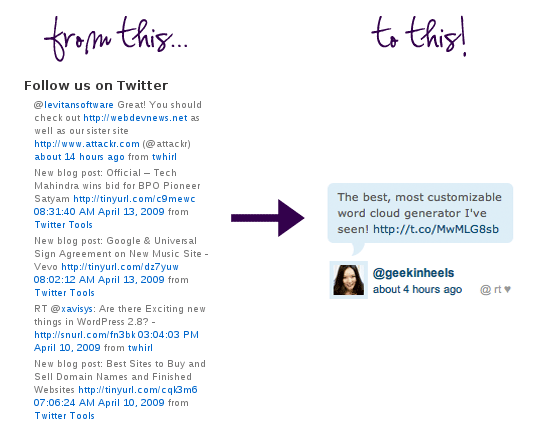
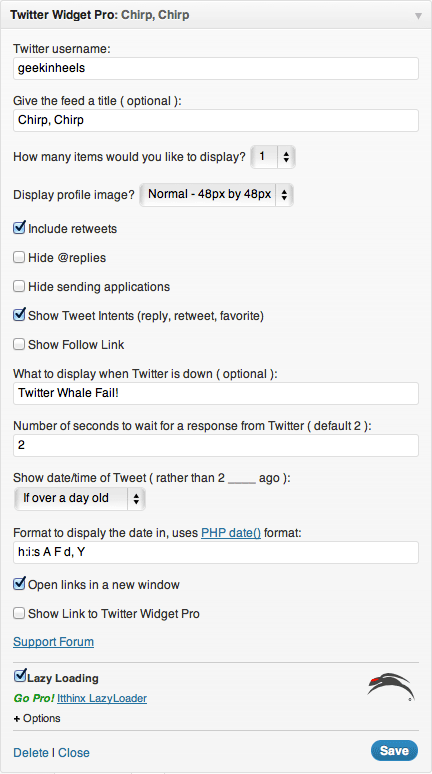
Another great thing about Twitter Widget Pro is that it gives you tons of options as a widget even before you get into the CSS. This is how I set up the widget in the “Widgets” section of my WordPress admin:
Now, let’s get to the nitty gritty part!
When you download the Twitter Widget Pro plugin, you will notice that the plugin package comes with several files. You want to locate the file called wp-twitter-widget.php and open it in your favorite text/code editor.
Now this is the important part. You want to REPLACE lines 561-680 with the following: (Note: these lines are consistent with the most current version of Twitter Widget Pro, which is version 2.3.8. If you are working with another version, the line numbers may be different.)
if ( empty( $args['title'] ) )
$args['title'] = "Twitter: {$args['username']}";
$args['title'] = apply_filters( 'twitter-widget-title', $args['title'], $args );
$args['title'] = "";
$widgetContent .= $args['before_title'] . $args['title'] . $args['after_title'];
$widgetContent .= '
- ';
if ( count( $tweets ) == 0 ) {
$widgetContent .= '
- ' . __( 'No Tweets Available', $this->_slug ) . ' '; } else { $count = 0; foreach ( $tweets as $tweet ) { // Set our "ago" string which converts the date to "# ___(s) ago" $tweet->ago = $this->_timeSince( strtotime( $tweet->created_at ), $args['showts'], $args['dateFormat'] ); $entryContent = apply_filters( 'widget_twitter_content', $tweet->text ); $widgetContent .= '
- ';
$widgetContent .= "
{$entryContent}"; if ( !empty( $tweets[0] ) && !empty( $args['avatar'] ) ) { $widgetContent .= ''; $widgetContent .= $this->_getProfileImage( $tweets[0]->user, $args ); $widgetContent .= ''; } $widgetContent .= " '; } if ( 'true' == $args['showintents'] ) { $widgetContent .= ' '; } $widgetContent .= ''; $widgetContent .= '
';
if ( ++$count >= $args['items'] )
break;
}
}
$widgetContent .= '
Even if you don’t know any PHP, you should be able to recognize some HTML lying within the code above. Pay particular attention to what comes after each instance of $widgetContent .= because that’s where the HTML is located.
The only things you may want to change are the symbols I used for Tweet Intents (reply, retweet, favorite). If you wish to do so, you can change them on lines 63, 69, and 75 above. Just replace what’s between the ‘ ‘ marks to get your desired effect.
Next, you want to add the following CSS. You can do this by pasting it to your style.css file, or create a new CSS file with the code and point to it in your theme.
.tweets {
	overflow: hidden;
	display: block;
	margin: 10px -2px 0 -2px;
	padding: 6px 6px 6px 10px;
	background-color: #DDEEF6;
	-moz-border-radius: 6px;
	-khtml-border-radius: 6px;
	-webkit-border-radius: 6px;
	border-radius: 6px;
	list-style: none;
	font-family: Verdana, sans-serif;
	font-size: 11px;
	color: #565656;
}

.twitter-bottom {
	margin: 0;
	padding-top: 16px;
	background: url('/images/twitter-stem.png') no-repeat 22px 0;
}

.twitter-avatar {
	float: left;
	margin-right: 5px;
	padding: 1px;
	height: 34px;
}

.twitter-avatar img {
	margin-top: 2px;
	border: 4px solid #DDEEF6;
	width: 30px;
	height: 30px;
}

.twitter-meta {
	margin-top: 6px;
	font-size: 11px;
}

.intent-meta {
	float: right;
}

.intent-meta a:link, .intent-meta a:visited, .intent-meta a:active {
	color: #999999;
}

.intent-meta a:hover {
	text-decoration: none;
	color: #666666;
}
What you will probably want to change here are the colors. The background color of the widget (the light blue) can be found on line 6, and you will notice that I used the same color for the border around my avatar (line 32). The text color is on line 14, while the links colors are on lines 47 (regular link color) and 52 (mouseover link color).
The only thing that I ask is that should you choose to use a bubble stem like I did on mine, you host it on your own server. My stem image can be found at this URL, which you can download to use for yourself. And, of course, should you do so, you should change the URL on line 20. (If you decide not to use a stem, you can just delete that line.)
And that’s it! I know that seeing all this code can be intimating, but I promise that if you follow the instructions carefully, it isn’t that bad at all.
As always, please leave any questions you may have by commenting to this post, and I will try my best to answer them!
ETA: Commenter Mochi and Macarons asked that I provide the exact code to be replaced rather than the line numbers. I have decided that it would be easier to provide the edited version of the wp-twitter-widget.php file which can be downloaded here in ZIP format.





Mochi and Macarons
Can you give the exact code to be replaced, rather than line numbers?
In my text editor, Lines 495 to 610 are not the same as yours, because I downloaded the file via FTP, so your line numbers are in the middle of chunks of code that would have empty tags if I deleted those lines.
Geek in Heels
First, my apologies — I had been working with an older version of Twitter Widget Pro, so that line numbers were incorrect. The correct lines are 561-680, and I have changed it accordingly in the post.
Second, because the plugin may continue to be updated in the future, it might not be prudent to just give out the code that needs to be replaced. (But the smart thing to do is to look for the chunk of code that begins with the first few lines, and ends with the last few lines of the replacement code.) So I have uploaded the edited version of the wp-twitter-widget.php file which can be downloaded in the link at the bottom of the post. Hope that helps!
mochiandmacarons
Thank you so much Jenny 🙂
mochiandmacarons
Another short note to everyone who is downloading the zip plugin as I did and making changes via FTP.
On line 596 you will have to replace Jenny’s @geekinheels Twitter ID with your own and re-upload the .php.
🙂
Thanks Jenny!
Geek in Heels
Sorry about that — it was actually two lines that needed this. It was correct in the original version, but not in the downloadable file. (This is what happens when you’re running on so little sleep with 2 babies!) I have uploaded the correct file to replace the mistake. There’s no need to change the Twitter username, as the code will automatically use your own.
Mochi & Macarons
I am so sorry to make you work like this. I appreciate and am totally grateful for your help, I LOVE these Bloggy Thursdays because I am clueless about all of this stuff.
🙂 Thanks again Jenny.
Geek in Heels
Not a problem — someone else is sure to have picked up the mistake! And thanks for the compliment; I’m glad they are helpful!
Rachael, Really. (@rachaelreally)
Wow! You are thorough! You have my complete and utter attention for the rest of the history of your blog.
I can’t wait to fix my widget up, it’s one of the many things on my side bar that I just can’t tolerate. (you’ll notice my .com forwards you now to my current tumblr site as I just can’t stand the unfinished look of my wp site attached to the .com — this will help immensely!)
Thank you. Thank you. Thank you. I will let you know in a follow up comment once I have the code worked out and widget up and running 🙂
Phoebe
Wow. Just…wow. Thank you so much for posting this! This is exactly what I was looking for the past few days.
Fred
I believe you have the line numbers incorrect in the following:
The only things you may want to change are the symbols I used for Tweet Intents (reply, retweet, favorite). If you wish to do so, you can change them on lines 50, 56, and 62 above. Just replace what’s between the ‘ ‘ marks to get your desired effect.
Geek in Heels
I apologize — those line numbers referenced the earlier version of the code, and I had forgotten to change them. The correct lines are 63, 69, and 75. I have changed the post to reflect the correction, and thank you for pointing it out!
Kira
Not sure if you’re looking for suggestions for Bloggy Thursdays topics but I’m interested in learning more about Stumbleupon – I had been getting a few hits here and there from it but suddenly this weekend, I was getting 900+ hits per hour, all from Stumbleupon, and I have no idea how or why. Are there ways that bloggers can use Stumbleupon as a tool to generate more traffic? Thanks!
Geek in Heels
Kira, I am taking suggestion for Bloggy Thursdays, but I unfortunately do not know much about Stumbleupon, at least not enough to write a post about it. What probably happened in your case is that a popular Stumbleupon user bookmarked your blog, and their subscribers saw that link and clicked on through.
kelsey
awesome! thanks so much for this 🙂
Maki
Hey there. Love this tweak. Though I’m getting a weird issue where there’s no line break between the time stamp and my twitter handle. Any ideas?
Geek in Heels
I would try adding a line break on line 37. So it should read:
Geek in Heels
Oops the code isn’t showing here. Add an HTML line break right after the first quotation mark, before the span tag. Hope that makes sense!
bonnie
Hi There,
First off, thanks for the EPIC tutorial. I appreciate it!
Can you clarify what exactly we’re supposed to type in for the line break?
I have the same problem, but it’s so close to looking good!
Thanks,
bonnie
Geek in Heels
You can easily look up how to enter line breaks at http://www.w3schools.com/tags/tag_br.asp (I can’t input the HTML here because the commenting system just seems it as code)
Dave
Thanks a lot from Italy. 🙂
Joshua Robbins
This was by far the easiest most straight forward explanation for customizing this widget. Thank you for taking the time to post this as I was searching for quite a while to find the answer.
Yong
Thanks for the great tutorial. What if I wanted to add my own stem on the top of the box? What is the css code for that? I’ve tried with no luck.
Andy
Thanks for this fantastic tutorial/how-to… it really gives the webpage a lift.
Cheers!
Andy, Belfast, UK.
Andy
Hi, just one tiny ‘bug’ in your Php script… on line 596, a is incorrectly closed with a … this causes the 2nd, 3rd etc tweets to be styled in bold when viewed in IE. Solution is to replace following line:
@{$tweet->user->screen_name}
with
@{$tweet->user->screen_name}
Hope this helps!
Andy
Andy
oops, html formatting doesn’t show…. my bad. Ok, line 596, just be sure to close with rather than .
Andy
Argh, I’m such a buffoon… ok, line 596 which has the link to tweeter’s url, close opening SPAN tag with a closing SPAN tag, instead of current STRONG tag.
Phew.
Please feel free to delete earlier comments!
Elia Winters
Thank you SO MUCH for this! I hated that ugly sidebar widget and seemed unable to fix it no matter what I tried. You’ve really made my week!
Efva
I still would rather know the actual code which should be changed. These line numbers tend to change all the time and you can’t just upload your code sheet (or the entire plug-in for that matter) to later versions so the specific code is actually very necessary so I can do this tweak. It’s always best to talk about the actual code.
Des
Try uninstalling your current plugin, downloading the 2.3.8 version, changing the files and uploading it. You can update it then, straight from wordpress. Worked great for me.
Sue Leipzig
Thank you so much – this worked great and only took me a few minutes. Also, since we’re going to the trouble of styling, take advantage of the option to change the php code date format in the settings:
g:i a F d will remove the leading zero, and only include minutes, not seconds. Plus I removed the year. There are lots of options.
BassLine
Thanks for the quick tutorial! I used your customization at my site, becouse it looks nice.
Thanks! BassLine
Robert Weiner
I just applied this change to version 2.5.1. The lines I replaced are 872 – 1013. I didn’t have to change anything in style.css (the changes I made to earlier versions still work).
— Robert
Robert Weiner
And in version 2.5.2 the lines are 861 – 980. Gawd, I wish the twitter widget folks would just incorporate this into their app!
Robert Weiner
Jeez, there’s a new version every day now. The changes need to be made from lines 868 – 987 in version 2.5.3
Geek in Heels
Thank you for keeping this updated!
Amber Engle
Please help! I am new to WordPress and not used to CSS. There are no number lines, so I don’t know what to change and where! Please Geek in Heels can you help me?
Thank you.
Eva
The link to your twitter stem picture is not working. Can you provide us with an updated link? Thanks much!!
Geek in Heels
The links should be working now. Sorry about that!
TS
Hi – this looks great. The link to your twitter-stem.png isn’t working however, any chance you can post a link so I can download?
Thanks
Geek in Heels
The link should be working now.
TS
Thank you!
TS
thanks for that and thanks for sharing this in the first place. For me it is appearing as a nice rounded-rectangular shape behind the tweet, but without the little triangle that makes it look like a speech bubble. Any idea what I’m doing wrong?
All help would be hugely appreciated!
Thanks in advance
bonnie
Hi There,
I implemented your code and it looks awesome! Thanks so much!
2 questions:
1. Can you please detail exactly how to create the line break in PHP to seperate my username from the date/time the tweet was posted? These are all on one line for me, and I’d like them to be on two lines like your example.
2. There’s a weird twitter icon separating each of my tweets. I’m not sure why. Can you please let me know how to get rid of the twitter bird between tweets?
Thanks,
bonnie
Geek in Heels
I’ve answered your first question above. As for the second question, I’m afraid I can’t help you as this is an old tutorial (hence the newer version of the WordPress plugin might have broken my mods), and I haven’t used this styling for Twitter in a while in my own website. I tried clicking over to your website to see what the problem looks like, but it looks like my mod isn’t active.
bonnie
Hi There,
Thanks for your help. I got the line to break, but am still trying to figure out the bird separator. No worries, though. I’m sure I can figure it out. I emptied my site cache if you want to check it out.
Thanks again for the awesome tutorial!
Sincerely,
Bonnie
Morten Blaabjerg
This is the single best formatting hack if one wants a “single tweet widget” which makes a personable impression and simply says “We are on Twitter too!”, with the added convenience of seeing the latest tweet and ease to plug into the conversation or follow one if one is so inclined.
Only problem is this hack is easily and regularly broken with each new version of WordPress or Twitter Widget Pro, as core files are modified.
Anyone up for making a more permanent solution? I Imagine either a forked version of the plugin, a whole new plugin or a permanent CSS-only solution that keeps the wonderful style of this hack, perhaps with the added benefits of customizing colors, fonts used etc.
Gianni
Hello, thanks for the great article. Can you help me out, where can I remove the “# followers” that shows next to the follow button. I cant seem to find it.
Richard
I have the same problem as above. I cannot find a way to remove the number of followers.
Robert Weiner
I’d been avoiding upgrading TW Pro so I wouldn’t have to keep making this change, but version 2.5.3 stopped working on my site. On version 2.6.0 the changes span lines 905 – 1024 in wp-twitter-widget.php
I wish the authors of TW Pro would incorporate this change. I’ve asked but they see no need.
室内空气净化|空气净化器|空气净化|净化器|除甲醛空气净化器专业生产厂家 慈溪欧能电器有限公司
Tremendous things here. I am very happy to look your article. Thank you so much and I’m having a look forward to touch you. Will you kindly drop me a e-mail?